Airtable pricing in 2026: what a 5, 15 and 40-person team pays, and when moving off is cheaper

- Published
- 15 November 2026
- Prices checked
- 15 November 2026
Airtable charges per editor: $20 a month on Team and $45 on Business billed yearly, or $24 and $54 month to month. Viewers are free. Five editors on Team pay $100–120 a month; 15 on Business $675–810; 40 on Business $1,800–2,160. From about 15 editors, the seats you save pay for your own app within a year.
Airtable plans and prices in 2026
| Plan | Price per editor a month | Records per base | Automation runs a month | API calls a month | Files per base |
|---|---|---|---|---|---|
| Free | $0, up to 5 editors | 1,000 | 100 | 1,000 | 1 GB |
| Team | $20 billed yearly, $24 monthly | 50,000 | 25,000 | 100,000 | 20 GB |
| Business | $45 billed yearly, $54 monthly | 125,000 | 100,000 | Unlimited | 100 GB |
| Enterprise Scale | Custom, through sales | Not published | Not published | Not published | Not published |
Swipe the table sideways for all columns. From airtable.com/pricing and Airtable's plans help page, last checked 15 November 2026. Automation runs and API calls count per workspace; records and files per base. Prices in US dollars.
Three rules decide your bill:
- Only editors pay. Airtable charges for people with edit rights on at least one base in the workspace. Its pricing page says read-only collaborators, form submissions and share links cost nothing on Team or Business.
- Yearly billing saves about 17%. $20 instead of $24 on Team, $45 instead of $54 on Business.
- Limits push you up a plan before seats do. A base with 60,000 records doesn't fit on Team, even with two editors. Neither does a workspace that runs 30,000 automations a month.
Paid plans also include AI credits each month: 15,000 per billable person on Team, 20,000 on Business, and 500 per editor on Free. Revision history is 2 weeks on Free and a year on Team and Business.
What a 5, 15 and 40-person team pays
| Team size | Team, yearly billing | Team, monthly billing | Business, yearly billing | Business, monthly billing |
|---|---|---|---|---|
| 5 editors | $100 ($1,200 a year) | $120 | $225 ($2,700 a year) | $270 |
| 15 editors | $300 ($3,600 a year) | $360 | $675 ($8,100 a year) | $810 |
| 40 editors | $800 ($9,600 a year) | $960 | $1,800 ($21,600 a year) | $2,160 |
| 40 people, 10 edit, 30 read-only | $200 ($2,400 a year) | $240 | $450 ($5,400 a year) | $540 |
Swipe the table sideways for all columns. Our arithmetic on Airtable's list prices, checked 15 November 2026. Before tax, without discounts or Enterprise deals.
A 5-person team can often stay on Free: up to 5 editors, 1,000 records per base and 100 automation runs a month. The 100 runs go first: one automation that fires on every new record uses them up after 100 new records. Team at $100–120 a month is the usual next step.
A 15-person team is where the plan choice starts to matter. Team covers most of it. Business, at more than double the price, is what you pay for 125,000 records per base, 100,000 automation runs, unlimited API calls and admin controls. Teams usually upgrade because they hit one of those limits.
A 40-person team pays the most for people who only look. Ten editors and thirty viewers cost a quarter of forty editors. Check who really edits before you renew.
How to pay less and stay on Airtable
If Airtable works for you, these cut the bill without moving anything:
- Turn occasional editors into read-only. People who only check status or add comments rarely need edit rights. Airtable bills on edit permission, so this is the biggest lever.
- Use forms for outside input. Clients, partners and field staff can submit through forms at no seat cost.
- Share views, not bases. A read-only share link answers "where is my order" without a seat.
- Pay yearly once the team is stable. It saves about 17%. Stay monthly while headcount is still moving.
- Archive old records. Moving last year's closed records to an archive base keeps the working base under the record limit, so you don't upgrade for history.
- Make automations run less. Trigger on a field change instead of every edit, and process only new or changed records. We built a yacht-charter agency's automation this way so its Make bill stayed light.
- Count your runs before upgrading. If the 25,000 runs on Team run out because one automation loops, fix that automation first.
These buy time. They don't change the model: every new person who edits adds $20–54 a month, for as long as you use Airtable.
4 systems we built on Airtable, and what they taught us
Between 2022 and 2024 we built on Airtable for four clients. In each one Airtable held the data, Make ran the automations, and a front end such as Bubble or Google Docs sat on top. Three were a good fit for what they did. One outgrew it.
| Client | What Airtable did | Result from the case page | Fit |
|---|---|---|---|
| US private investment firm | Payout base behind Bubble investor and admin portals, with Make | Monthly payout run from 3 days to about an hour; $9M+ paid out in a year | Good: ran monthly for over a year; the founder asked for the same system for a new fund |
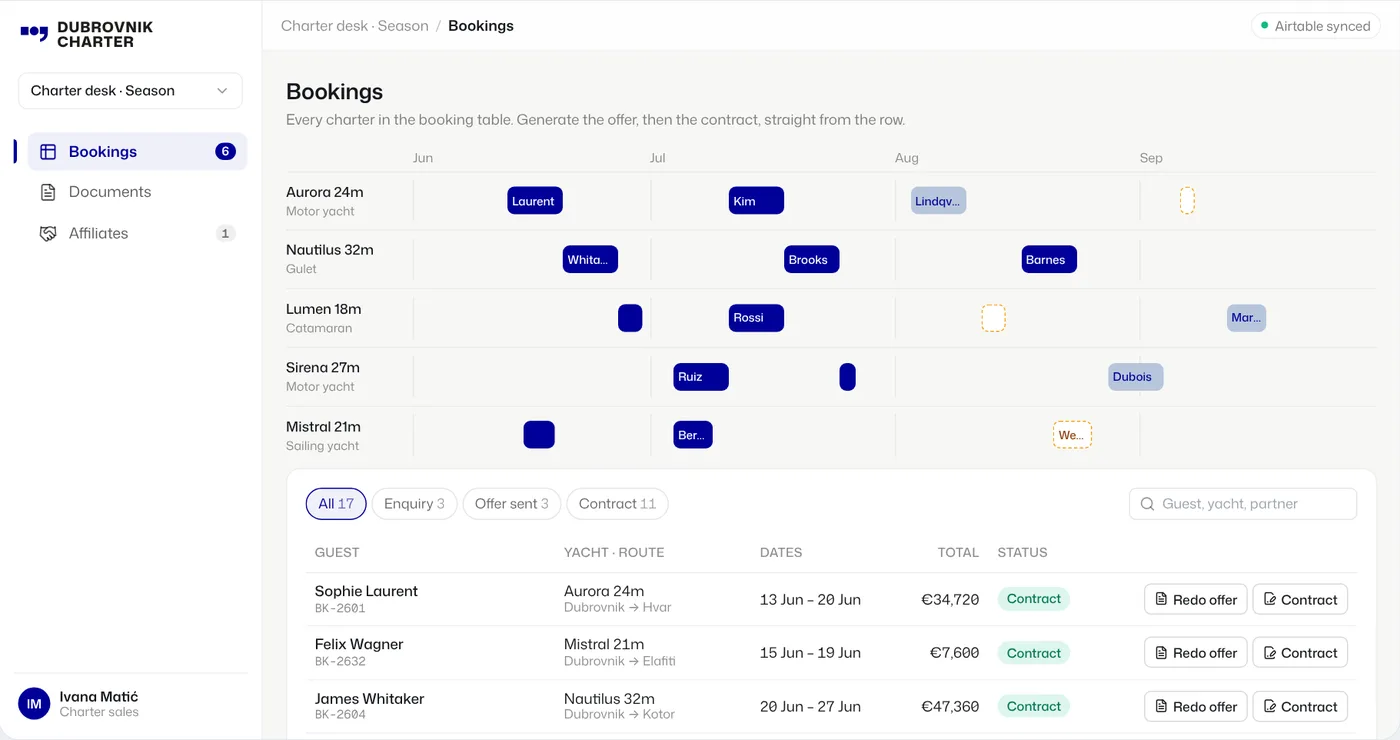
| Dubrovnik Charter | Booking database; Make turns a record into an offer or contract in Google Docs | 1 step from a booking record to a finished offer | Good: small team, documents out |
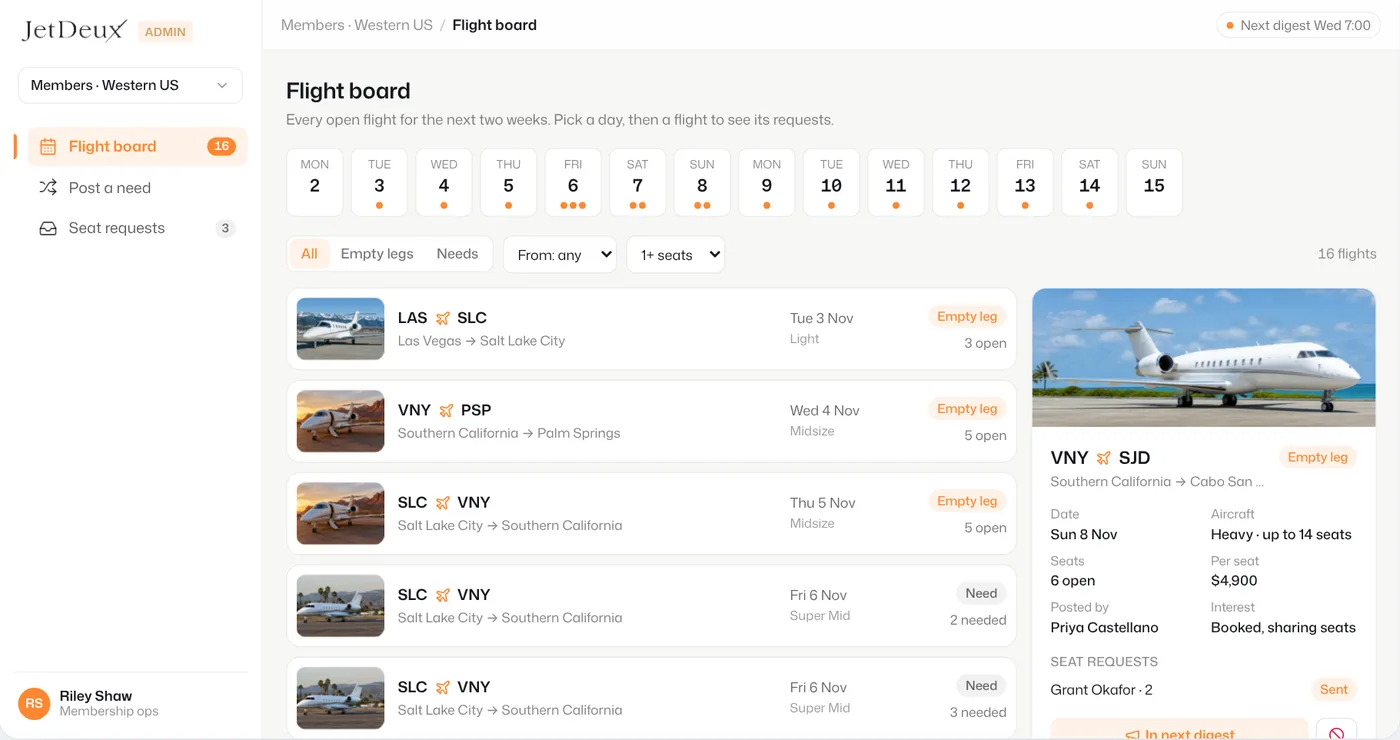
| JetDeux | Member and flight data behind a Bubble app, with matching digests sent by Make | Core built in 2 weeks; digests 3 times a week for 5 months | Good for an MVP |
| Arrenda1 | Started there; the data moved to Supabase as onboarding grew | Upload portal in 1 week; V1.0 of full onboarding in about 11 weeks | Outgrew it |
Investor payouts for a US private investment firm
AI runs on · Airtable and Make for the payout base, Bubble for the investor and admin portals, Slack alerts
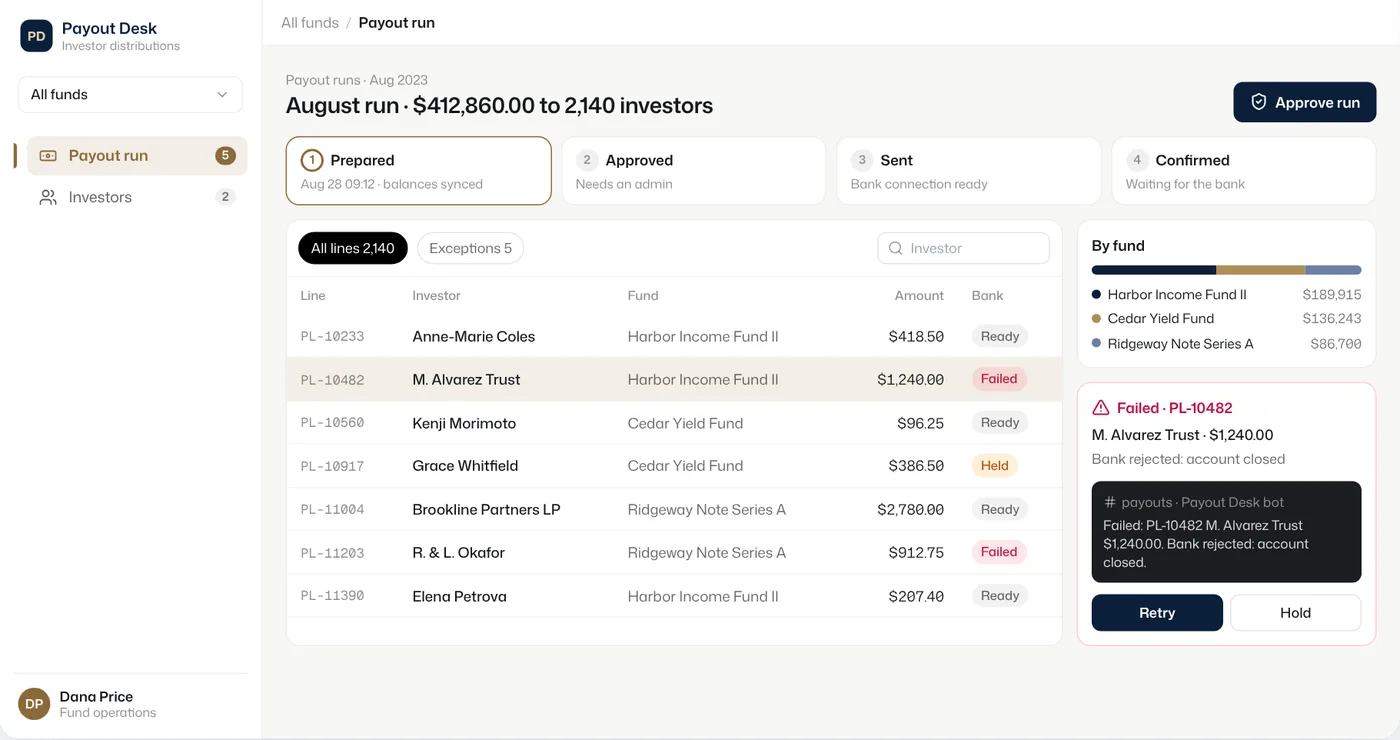
The firm paid monthly distributions to thousands of investors by hand: pull balances, calculate each payout, push the transfers, notify everyone. Each run took about three days.
We built a payout workflow that moves each run through prepared, approved, sent and confirmed, with every step logged. Investors log in with 2FA and see their own positions and payouts. More than $9M went out through it in a year.
The firm's bank had no public API for the payouts, so there was no ready Make module. We built a custom connection. Exceptions post to Slack, so a failed transfer is retried or held by a person.
Leasing onboarding for Arrenda1 that moved off Airtable
AI runs on · Bubble front end, Airtable then Supabase for data, Make, HubSpot, a credit-bureau API
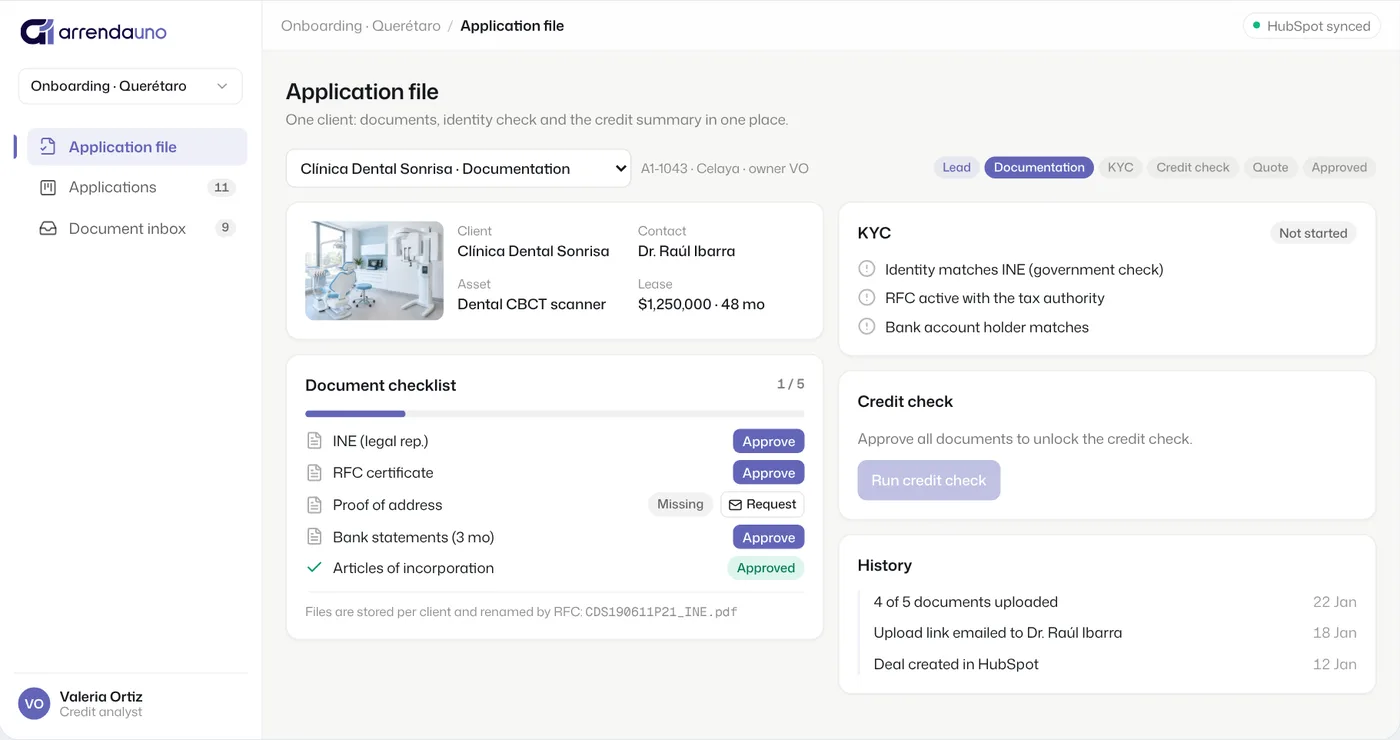
Arrenda1, a leasing company in Querétaro, Mexico, ran its CRM in Notion and chased documents by email and WhatsApp. The first build was an upload portal in one week. Then they asked for full client onboarding: KYC checks, credit-bureau reports filled into a one-page summary, and onboarding that starts when a HubSpot deal reaches the documentation stage.
The data would not scale in Notion or Airtable: onboarding needed logs and file storage for every client. We moved the data from Airtable to Supabase in the first weeks of the build. In February 2024 usage had grown enough that the database moved to a bigger plan.
When moving off Airtable is cheaper
Your own app has a different cost shape. You pay once to build it, then a flat amount to run it, whatever the headcount. For a small business app we use Supabase Pro ($25 a month) and one Vercel Pro seat ($20 a month), plus a Claude Pro plan ($20 a month) for the person who asks Claude Code for changes. That is about $65 a month, or $780 a year. Free tiers of both exist, and many small apps fit them.
| Team | Airtable, yearly billing | Own app, running cost | Left each year to pay for the build |
|---|---|---|---|
| 5 editors on Team | $1,200 | $780 | $420 |
| 15 editors on Team | $3,600 | $780 | $2,820 |
| 15 editors on Business | $8,100 | $780 | $7,320 |
| 40 editors on Business | $21,600 | $780 | $20,820 |
Swipe the table sideways for all columns. Airtable list prices from airtable.com/pricing; Supabase Pro from supabase.com/pricing; Vercel Pro from Vercel's docs; Claude Pro monthly from claude.com/pricing. All checked 15 November 2026. Running cost excludes AI usage by the app and email sending.
Read the last column as your budget. At 5 editors, the savings take years to cover any build, so stay unless a limit forces you. At 15 editors on Business, $7,320 a year covers a first build several times over; ours start at $1,990 for one process. At 40 editors the case is clear on cost alone.
Cost is rarely the only reason. The teams we moved also wanted things a base doesn't do well: real logins for clients, money moving through a step-by-step flow with a log, files and history per customer.
airtable-exit: our free kit to move a base into your own CRM
AI runs on · Claude Code, with Next.js on Vercel, Supabase and GitHub in your own accounts
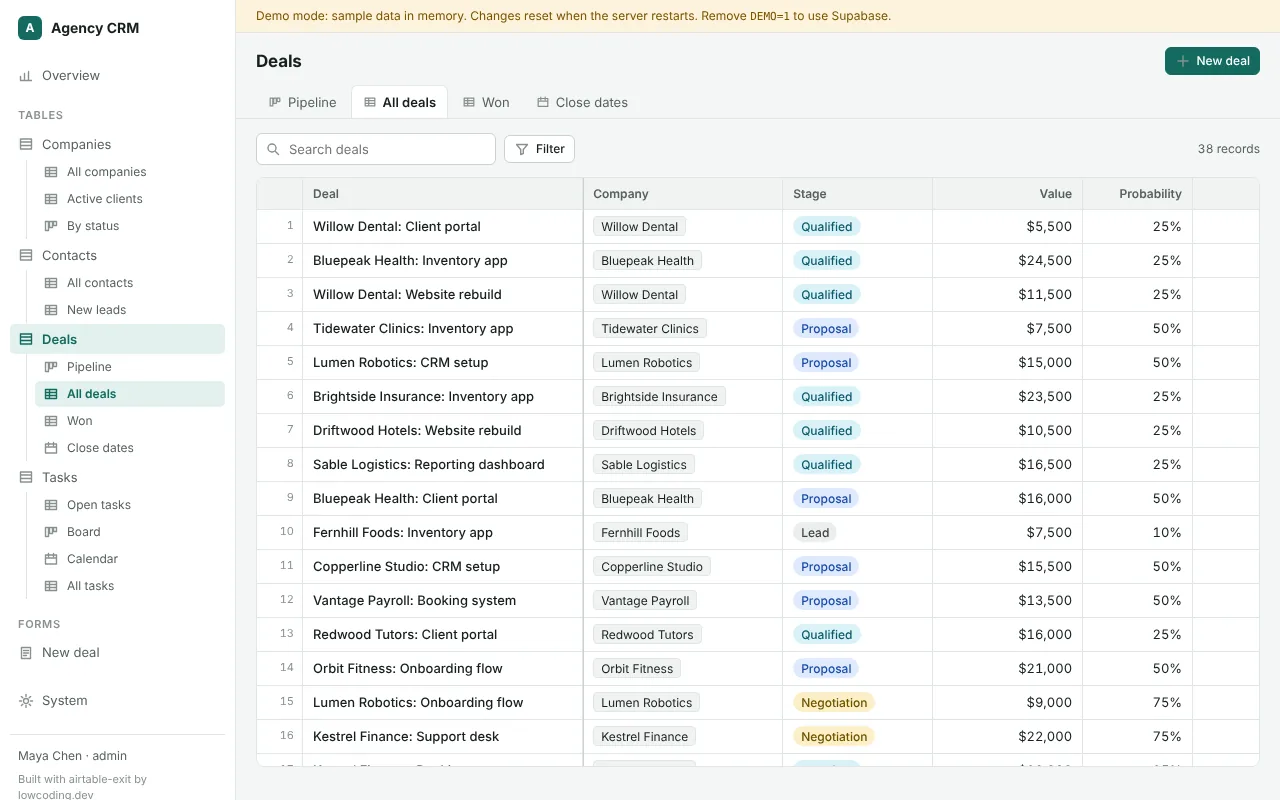
We packaged the move as an open-source Claude Code plugin (github.com/hichock/airtable-exit, MIT). Claude reads your base with a read-only token: tables, formulas, automations, interfaces, who edits what. It shows one plan, then builds a CRM in your own GitHub, Supabase and Vercel, copies the data and runs both in parallel with a nightly sync until you switch.
The app has grid, kanban, calendar, record pages, forms and dashboards, with sign-in for invited people only and roles enforced in the database. It needs a paid Claude plan; the hosting runs on free tiers by default.
Airtable's API doesn't expose view filters, sorts, rollup functions or lookup filters, so the agent guesses them, flags each guess and checks values after the copy. The kit is unit-tested and its SQL tested on Postgres, but it hasn't run against a live customer base yet. That is why it starts read-only.
Why we build this in code now
We used Airtable, Make and Bubble for years, and the systems above worked. We stopped starting new builds there for three reasons we hit ourselves:
- Limits arrive with success. Records per base, runs per month and API calls all grow with the business. Arrenda1's data model outgrew a base during the build. At Dubrovnik Charter, we had to design the automation around saving operations.
- Logic spreads out. Formulas live in fields, rules in automations, more rules in Make, the screens in Bubble. One change touches four tools. In code it is one repository with a history of every change.
- Code got fast. With Claude Code, a working version with a database, logins and a screen for each role takes about a week. We'd build the investor portal in code today, in the client's own accounts.
Airtable is still a good tool for a small team. It has a ceiling, and next to code in 2026 you reach it sooner.
When not to move off Airtable
- Few people edit. Under about 5–10 editors, the seat bill is small and a rebuild rarely pays for itself.
- Your team designs its own bases. Airtable's best feature is that an ops person can add a field or a view in a minute. If they do that weekly, keep it.
- The base is far from every limit. Thousands of records, a few hundred runs a month. Nothing is forcing you.
- Nobody will own the new app. Someone has to own the accounts, read Claude's changes and answer when a sync fails. If that is nobody, stay, or hire someone who will.
- You need Airtable's add-ons. Interfaces, extensions and integrations you rely on each need a replacement. List them before you decide.
Questions people ask
- Is Airtable free?
Yes, there is a Free plan: up to 5 editors, 1,000 records per base, 100 automation runs and 1,000 API calls a month per workspace, 1 GB of files per base and 2 weeks of revision history (checked 15 November 2026).
- How much does Airtable cost per user?
Team is $20 per editor a month billed yearly or $24 monthly. Business is $45 billed yearly or $54 monthly. Enterprise Scale is priced by Airtable's sales team. Only people with edit rights count as paid users.
- Do read-only users count as seats in Airtable?
No. Airtable's pricing page says read-only collaborators, form submissions and share links cost nothing on Team and Business. You pay for people with edit permission on at least one base in the workspace.
- What is the Airtable record limit?
1,000 records per base on Free, 50,000 on Team and 125,000 on Business. Enterprise Scale limits are not published. Above your plan's limit, you upgrade, split the data across bases or archive old records.
- Is Airtable cheaper monthly or yearly?
Yearly: $20 instead of $24 on Team, $45 instead of $54 on Business, about 17% less. Monthly billing makes sense while your headcount is still changing.
- What is cheaper than Airtable for a growing team?
A small app on your own database. Supabase Pro ($25 a month) and a Vercel Pro seat ($20) cost the same for 5 users or 50, plus whatever it costs to build. Other no-code databases price per seat too, so compare them at your real editor count.
SOURCES
- 1.Airtable pricing (airtable.com) · checked 15 November 2026
- 2.Airtable plans: limits per plan (Airtable Support) · checked 15 November 2026
- 3.Supabase pricing (supabase.com) · checked 15 November 2026
- 4.Vercel Hobby and Pro plans (Vercel docs) · checked 15 November 2026
- 5.Claude plans and pricing (claude.com) · checked 15 November 2026
- 6.airtable-exit: open-source Airtable-to-own-CRM kit (GitHub) · checked 15 November 2026
- 7.Case: investor payouts for a US private investment firm · checked 15 November 2026
- 8.Case: Arrenda1 leasing onboarding · checked 15 November 2026
- 9.Case: Dubrovnik Charter offers and contracts · checked 15 November 2026
- 10.Case: JetDeux private-jet seat sharing · checked 15 November 2026
Drafted with Claude from our project records; checked and edited by Mark.