Sales follow-up emails that write themselves from your CRM, and still sound like you

- Published
- 19 November 2026
- Prices checked
- 15 November 2026
A good sales follow-up email answers the last conversation, adds one new useful point and asks for one easy next step. Templates get the shape right but sound like templates. The better route for a small team: your CRM decides who is due, Claude drafts each follow-up from that deal's emails and notes, and you approve before it goes.
Why follow-ups are where small teams lose deals
Most lost deals in a small business are not lost to a competitor. They go quiet. The quote went out, the client meant to reply, a week passed, and nobody wrote again because everyone was doing the actual work.
Two numbers explain why this matters, and both come from vendors, so read them as direction rather than law:
- In Instantly's 2026 benchmark of cold email on its platform, the first email brought 58% of replies and the follow-ups brought the other 42%. Stop after one email and you leave close to half the answers on the table. A short, reply-style second email did about 30% better than a formal one.
- In the InsideSales.com and MIT lead response study, the odds of qualifying a lead were 21 times higher when the first contact came within 5 minutes of the enquiry than after 30 minutes. That study measured contact and qualification, not signed deals, and it is old, but nobody has published a study showing that slow replies win.
The pattern behind both: people answer when the message arrives while the topic is still in their head, and when it is easy to answer. Everything in this guide serves those two things.
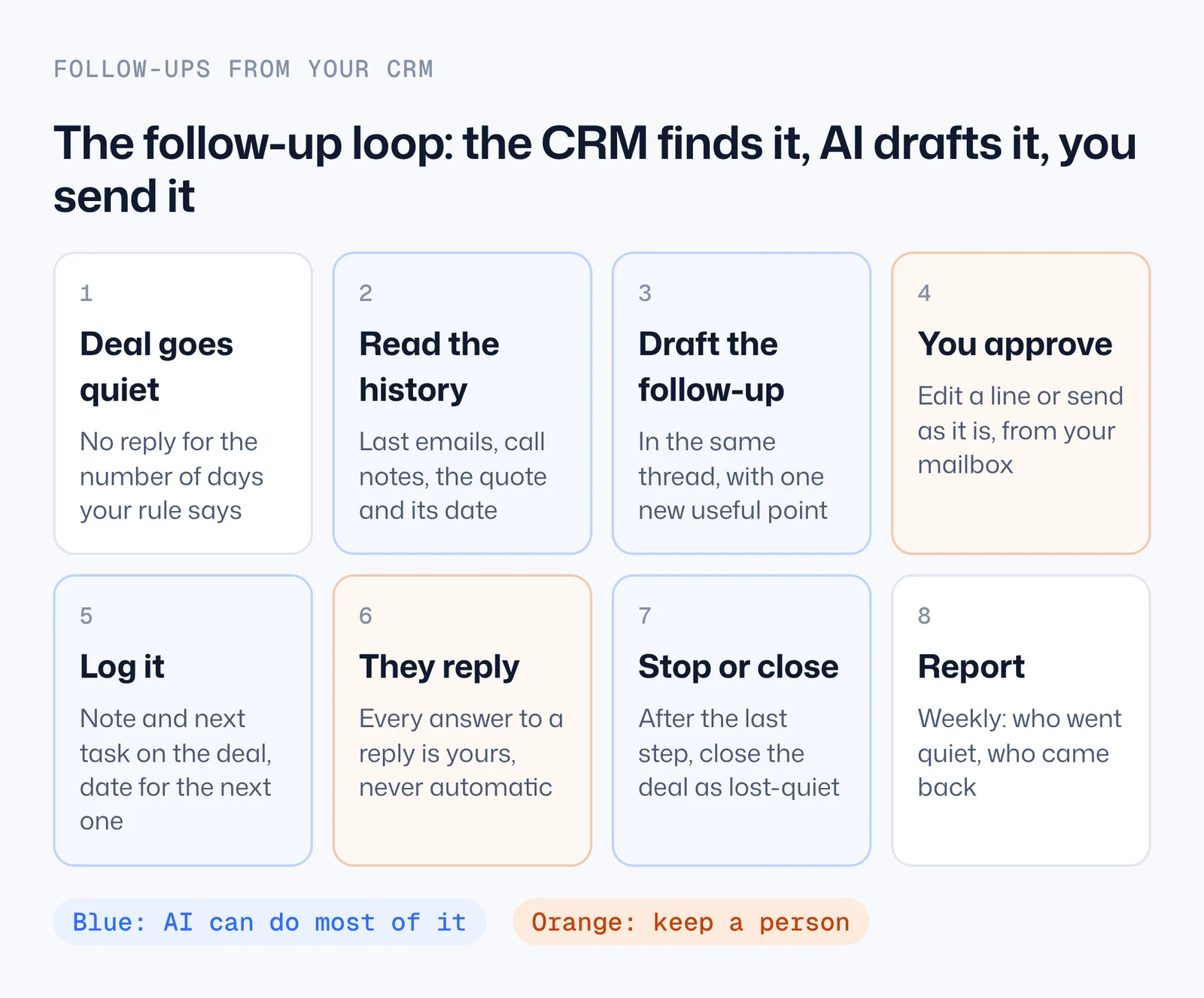
The follow-up rules: when to write and when to stop
Before any tool, write your rules down once. They are the part a CRM or Claude can follow every day without you, and they are the part most teams never write. Here is a starting set for a business that sells projects or services by quote. Adjust the days to your sales cycle: a $500 job and a $50,000 contract don't move at the same speed.
| Situation | When | What the email does | Stop when |
|---|---|---|---|
| New enquiry | Within minutes, in working hours | Answers the question they asked and offers one next step (a call slot, a site visit, a price range) | They reply or book |
| After a call or meeting | The same day | Recaps the call in their words: what they want, what you'll do, what they'll do, the date | The recap is sent |
| Quote sent, no reply | Day 3 to 6 | Adds one new useful point about their job and asks one easy question | They reply |
| Still nothing | Day 10 to 14 | Short, makes "not now" easy to say, holds or releases the start date | This is the last one: close the deal as quiet |
| Old lead, months later | Only when something changes | Gives a real reason: a new slot, a new price, a result for a business like theirs | One email, no sequence |
Swipe the table sideways for all columns. Our recommendation, not a study. Two follow-ups after a quote is enough for most warm deals; a third rarely changes the answer and starts to cost goodwill.
The 2-2-2 rule that comes up in searches is one version of the same idea: follow up after 2 days, then 2 weeks, then 2 months. It works for slow sales with long gaps. For quotes, where the client is comparing you with two others this week, the gaps are too long.
When to stop matters as much as when to start. A deal that has had its last follow-up should be closed as "quiet" in your CRM, not left open. Open deals that nobody touches make your pipeline look bigger than it is, and they keep showing up in every follow-up list.
What a good follow-up email says (with examples)
Every good follow-up has three parts, and a template can only give you the frame:
- It picks up the last conversation. Not "just checking in", but the thing they said: the January deadline, the noise worry, the budget.
- It adds one new, useful point. Something they didn't have before: a way to solve their worry, a date that works, a detail you left out of the quote.
- It asks for one easy next step. A yes-or-no question beats "let me know your thoughts".
And it goes in the same email thread, as a reply, so they see the whole story in one place. A new email with a new subject line looks like a newsletter.
Here are the patterns for the four situations people search for most. The bracketed parts are what has to come from your notes, which is exactly what Claude fills in from your CRM.
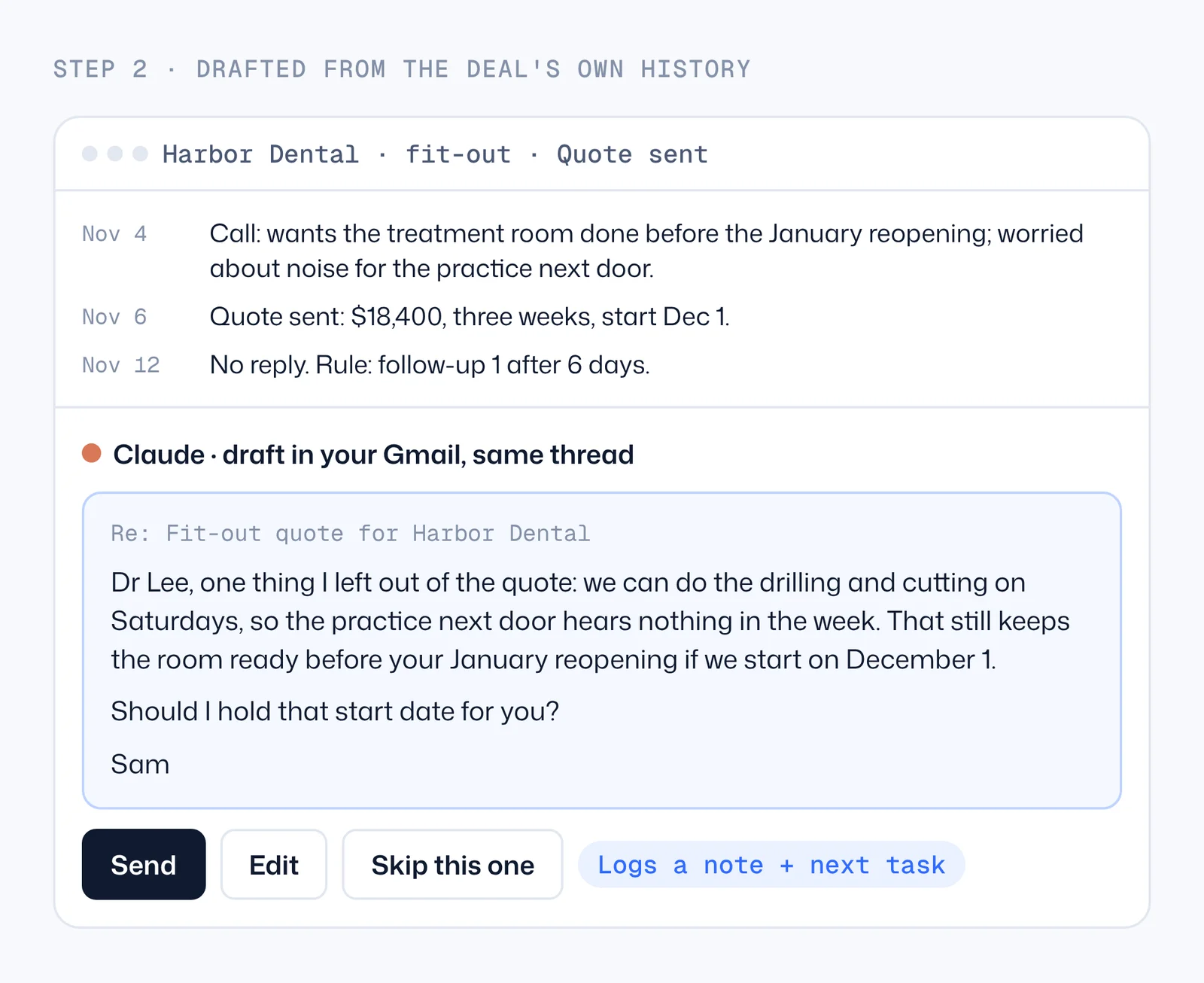
[Name], one thing I left out of the quote: [a detail that solves the worry they mentioned]. That still keeps [their deadline] if we start on [date]. Should I hold that start date for you?
[Name], I don't want to keep filling your inbox. If [the project] is on hold or went another way, just say so and I'll release the [date] slot. If it's still on, I can [one small easy step].
Thanks for the time today. What I heard: [their goal in their words], [their main worry], [their deadline]. Next from me: [what you'll send and when]. From you: [what they promised]. We said we'd speak again on [date].
[Name], we spoke in [month] about [project]. Since then [the real change: a new slot, a lower price, a finished job like theirs]. If it's back on your list, I can [easy step]. If not, no reply needed.
Four ways to send follow-ups, and which one fits you
| Route | Good fit | What it costs | Watch out for |
|---|---|---|---|
| 1. A reminder and you write (a task in the CRM or calendar) | Under ~10 open deals; every email is very personal | Free in most CRMs | The reminder gets snoozed; writing is still the slow part |
| 2. CRM sequences (HubSpot sequences and similar) | Many similar leads that need the same 3 to 5 emails | HubSpot sequences need Sales Hub Professional or Enterprise: $90 per seat a month billed yearly, plus a $1,500 one-off onboarding | Every lead gets the same words; replies to a template stop the sequence but read like a template |
| 3. Claude drafts each one from the CRM (connector + your mailbox) | 10 to a few hundred open deals where each email should reference the real conversation | A Claude paid plan, from $17 a month billed yearly, plus the CRM you already have | Write access depends on the connector and your CRM permissions; keep a person approving |
| 4. A custom follow-up system (your rules, your data, built for you) | Several mailboxes, team rules, reply sorting, reporting | A build, then hosting in your own accounts | Worth it when the rules and volume grow; overkill for one person |
Swipe the table sideways for all columns. HubSpot prices from hubspot.com, Claude prices from claude.com, checked 2026-11-15. Sequences plan requirement from HubSpot's knowledge base, checked 2026-11-19.
Most small teams should start with route 3 for warm deals and keep route 2 only if they also run cold outreach. The difference shows in the reply: a sequence email says "I wanted to follow up on my last message", a drafted one says "one thing I left out of the quote: we can do the drilling on Saturdays".
Setup: connect your CRM and your mailbox to Claude
You need a paid Claude plan, your CRM login and your email login. No code.
- Open Claude (the desktop app or claude.ai) and go to Settings → Connectors, then Browse connectors.
- Find your CRM: HubSpot, Pipedrive and Zoho CRM are in the directory. Click Connect and sign in with your own CRM login.
- Do the same for Gmail, or for Microsoft 365 if you use Outlook, so drafts land in your own mailbox.
- Start a new chat and ask: "Which of my open deals have had no contact for more than 5 days?" If you get a list with names and dates, the connection works.
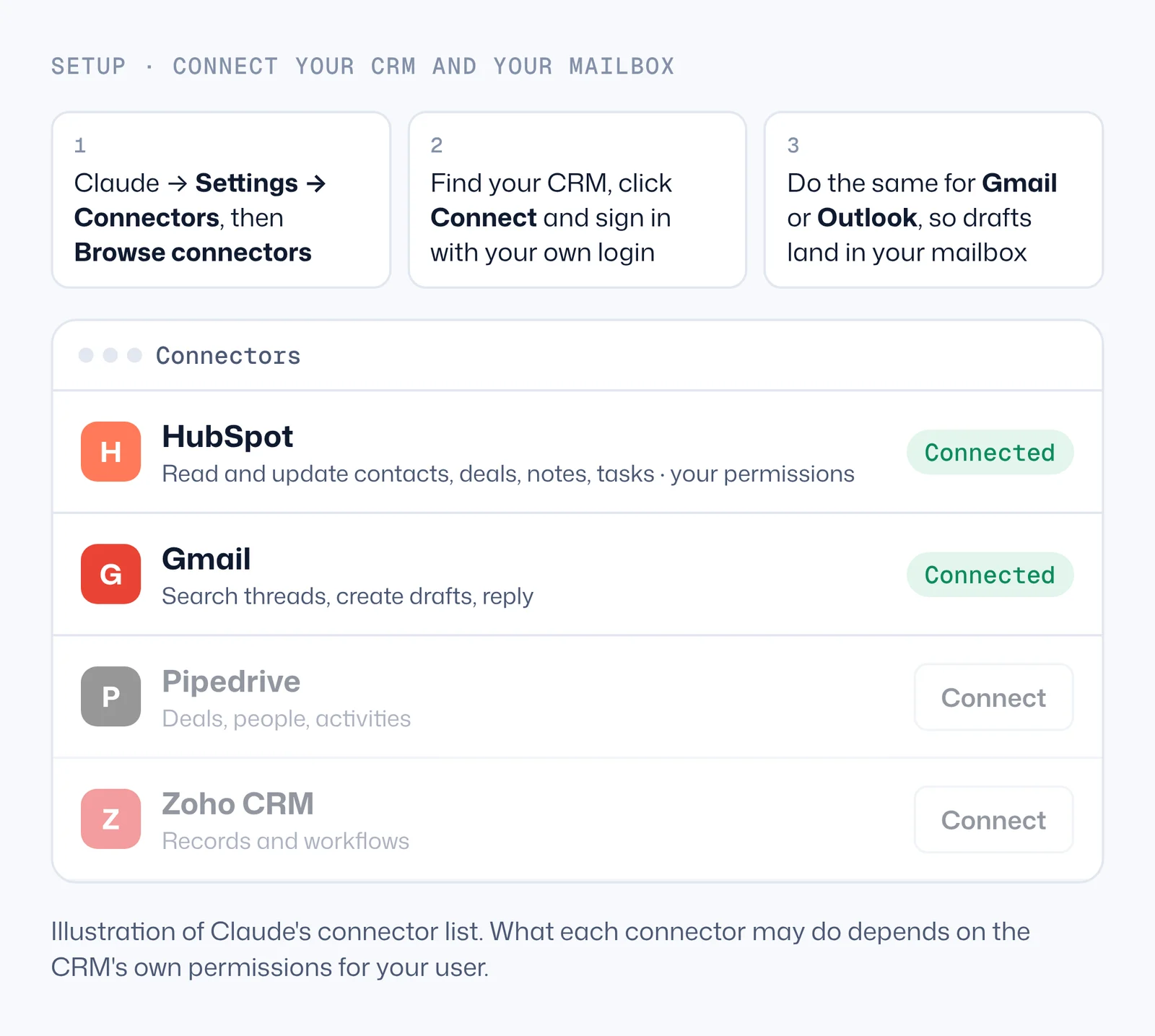
What each connector can do (checked 19 November 2026):
- HubSpot: searches and updates contacts, companies, deals and tickets, logs activities and reads the history of emails, calls, meetings, notes and tasks. Create and update are marked beta, bulk changes are capped at 10 records per request, and it can't delete. It only sees what your HubSpot user may see, and every change it makes is recorded in HubSpot's audit log under your name and the connector. A Super Admin (or someone with App Marketplace permission) has to install it first. If yours was connected before 20 November 2025, reconnect it to get edit access and the engagement history.
- Gmail: searches and reads threads, creates drafts, replies and can send. For follow-ups, use drafts: you read, you press send.
- Pipedrive and Zoho CRM: listed in Claude's connector directory and working under your own user permissions. Check the connector page for what your plan allows.
- GoHighLevel: no connector in Claude's directory. Community-built ones need your API key; for an owner, GoHighLevel's own workflows or a builder are the safer route.
The daily follow-up list, drafted for you
This is the core of the guide: one prompt that turns your rules into a list of drafts every morning.
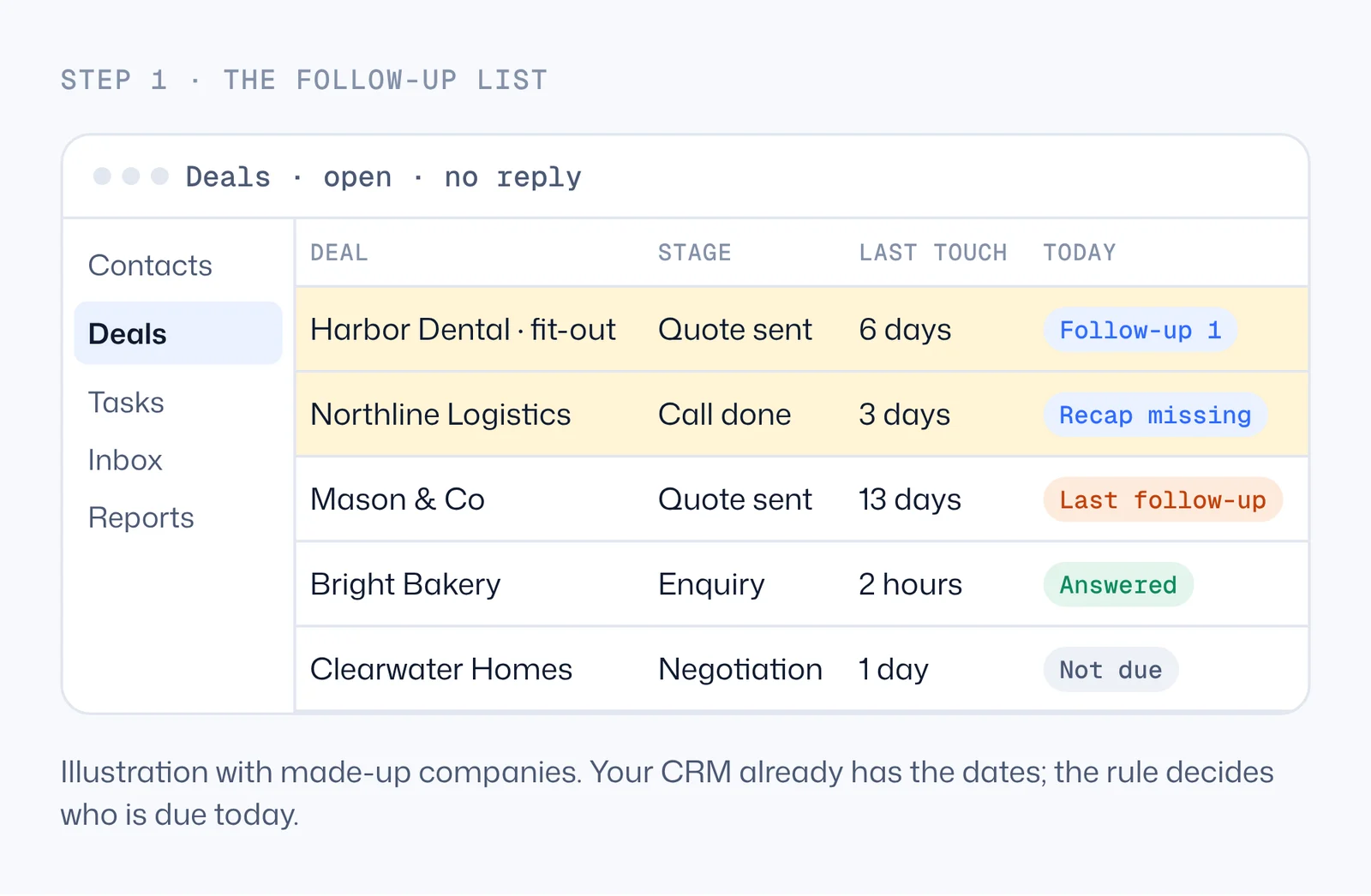
Look at my open deals in HubSpot. Using these rules, find the ones due for a follow-up today: - Quote sent and no reply for 5 days: follow-up 1. - Follow-up 1 sent and no reply for 7 more days: last follow-up. - A call logged with no recap email the same day: recap. For each deal, read its last emails and notes, then write a draft reply in my Gmail, in the same thread as my last email to them. Each draft: no greeting line, picks up what they last said, adds one new useful point taken from the notes (never invented), asks one yes-or-no question, under 90 words, signed with my first name. Don't send anything. Then show me a table: deal, rule, the first line of the draft, and anything you couldn't find.
Steps
- Paste your own rules into the prompt. Use your real stage names: if your quote stage is called "Proposal", say "Proposal".
- Run it, then open Gmail's Drafts. Read each one, change a line if you want, and send.
- When you're happy with the drafts for a week, ask Claude to also log a note on each deal ("Follow-up 1 sent on [date]") and create the next task for the day the next rule fires. That keeps your CRM honest.
- In the Claude desktop app, a Cowork scheduled task can run the same prompt every weekday morning. Scheduled tasks are on paid plans; a task that works with a folder on your computer only runs while the computer is awake and the app is open.
Speed to lead: answer new enquiries while they still care
The first reply to a new enquiry is a follow-up too, and it's the one with the biggest effect. The same setup handles it: when a form fill or an email lands, Claude reads it, checks the CRM for an existing contact, and writes a draft that answers the actual question and offers a slot. You only read and send.
Two ways to run it. Paste the enquiry into Claude when it lands and the draft is ready in about a minute. Or ask Claude to run the prompt below as a scheduled task every hour on weekdays (hourly is the most frequent schedule Claude offers), so every enquiry gets a draft within the hour without you starting anything. Scheduled tasks run in the cloud, so they keep running while your laptop sleeps.
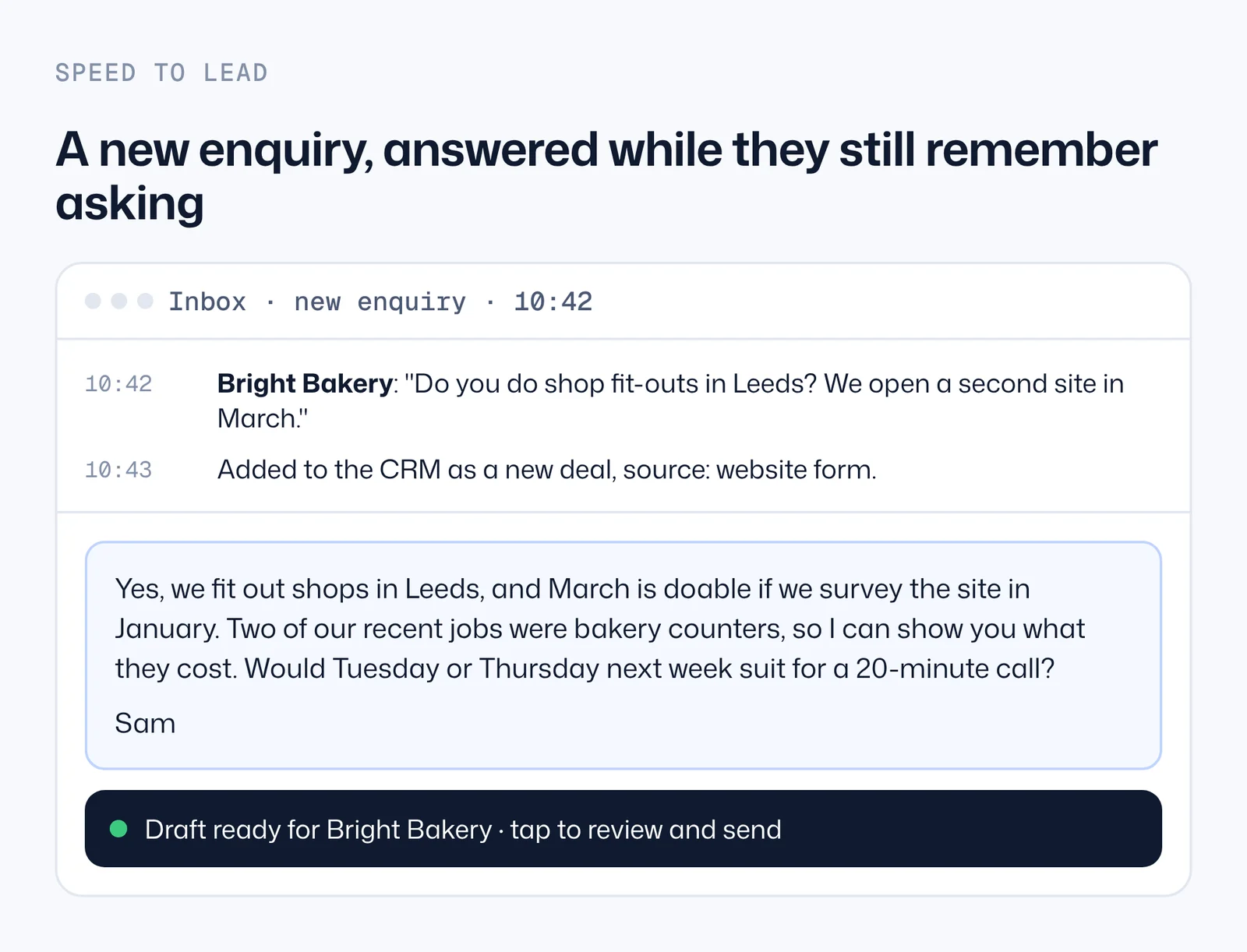
Look for new enquiries in my Gmail inbox since the last run (or use the one pasted below). For each, check HubSpot for this person or company. If they're new, create a contact and a deal in the Enquiry stage with the source. Then draft a reply in my Gmail that: answers the exact question they asked in plain words, mentions one relevant job we've done only if it's in our case notes, and offers two call times next week. Under 80 words, signed with my first name. Don't send it.
Two rules keep this safe. First, a new enquiry is answered by a person pressing send, even if the draft is ready in a minute: that one minute of reading is cheap. Second, once someone has replied to you, every answer to them is yours. Automation can remind you and draft; it shouldn't hold the conversation.
Pipedrive, Zoho, GoHighLevel and a plain inbox
The prompt above names HubSpot, but nothing in it is HubSpot-specific. Swap the CRM name and the stage names and it works the same way with any CRM Claude can read.
- Pipedrive. Connect it from the directory, then ask for deals "in the Proposal Made stage with no activity for 5 days". Pipedrive's activities (calls, emails, tasks) are what Claude reads as history, so the drafts are only as good as what your team logs there.
- Zoho CRM. Same pattern with Zoho's deal stages. If you use Bigin, Zoho's smaller CRM, check that the connector you add covers Bigin and not only Zoho CRM.
- GoHighLevel. There's no connector in Claude's directory. You can still draft by hand: export the opportunities that are due as a spreadsheet, give it to Claude with the conversation history, and paste the drafts back. For anything regular, GoHighLevel's own workflows or a builder are the better route.
- No CRM at all, just Gmail or Outlook. Your inbox already knows who you're waiting on. Ask Claude to find threads where your email was the last one, sent more than 5 days ago, to someone outside your company, and to draft the follow-up in each. It's a rough CRM, but it catches the quotes that would otherwise disappear.
Search my Gmail for threads from the last 30 days where I sent the last message, more than 5 days ago, to someone outside my company, and the thread is about a quote, a proposal or a call. Skip newsletters, invoices and anything where they said no. For each one, draft a reply in the same thread: no greeting line, picks up their last point, adds one useful detail from the thread, asks one yes-or-no question, under 80 words, signed with my first name. Don't send. Then list them for me with the date of my last email.
What to measure after the first month
You don't need a dashboard to know whether this works. Four numbers, checked once a month, are enough:
- Deals that went quiet without a follow-up. This should drop to zero. It's the whole point.
- Replies to follow-ups, split by step: how many came after follow-up 1, how many after the last one. If almost nothing comes from the last step, shorten the sequence.
- Time from enquiry to first reply, in working hours. Under an hour is good for most service businesses; minutes is better.
- Drafts you rewrote completely. If you rewrite more than one in five, the notes in your CRM are too thin, or the rules in the prompt don't match how you sell. Fix the notes first.
The last number is the one people forget. The quality of an AI follow-up is capped by the quality of what was logged after the call. Two lines of notes ("wants it before January, worried about noise next door") are what turn a template into a follow-up that sounds like you were listening.
Approval, logging and the mistakes to avoid
| Check | Why it matters | How |
|---|---|---|
| Drafts, not sends | A wrong name or a wrong price in a sent email can't be taken back | Ask for drafts; send them yourself |
| Nothing invented | AI fills gaps with plausible details; a made-up date or discount costs trust | Say "only facts from the emails and notes; leave a gap if unsure" |
| Never answer a reply automatically | The moment they answer, the conversation needs you | Rule in the prompt: skip deals where their last message is newer than yours |
| Stop after the last step | Endless follow-ups annoy people and fill your pipeline with dead deals | Close the deal as quiet after the last rule |
| Same thread, same mailbox | A new subject from a different address looks like marketing | Reply in the thread from the mailbox that sent the quote |
| Log what was sent | So the next follow-up and your colleagues know the history | Note on the deal + next task, or BCC your CRM's logging address |
Deliverability basics. Warm follow-ups from your own mailbox, inside an existing thread, rarely have delivery trouble. Problems start when follow-ups turn into volume: hundreds a day from one mailbox, link-heavy emails, open tracking pixels and new subject lines. If you send more than a few dozen a day, your domain needs SPF, DKIM and DMARC set up (your email provider's admin page shows whether they are), and cold outreach belongs on separate domains, never on the mailbox your clients know.
What it costs
| Setup | Monthly cost | What you still do |
|---|---|---|
| CRM tasks + writing yourself | Your CRM plan | Write every email |
| HubSpot Sales Hub Professional with sequences | $90 per seat billed yearly, plus $1,500 one-off onboarding | Write the templates; handle replies |
| Claude drafting from your CRM | Claude Pro from $17 billed yearly ($20 monthly), plus your CRM plan | Read and send the drafts; handle replies |
| A custom follow-up system | A one-off build, then hosting in your accounts | Approve; handle replies |
Swipe the table sideways for all columns. Prices checked 2026-11-15 on hubspot.com and claude.com. Team plans cost more per seat.
When to have it built instead
The prompt route covers one person and a few hundred deals. Teams outgrow it when follow-ups come from several mailboxes, when replies need sorting (interested, not now, wrong person, out of office) before anyone reads them, or when the owner wants a weekly report of who went quiet. That's when the rules move out of a prompt and into a small system that runs in your own accounts.
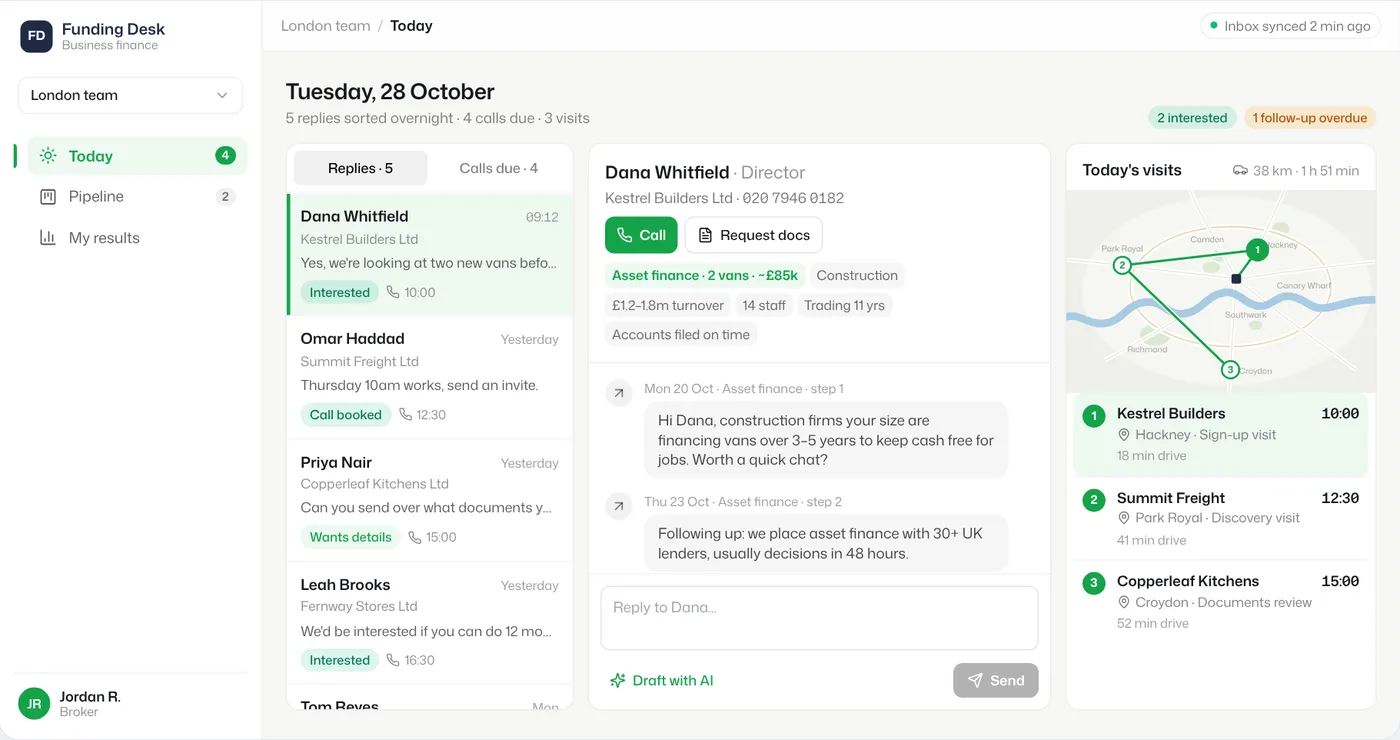
Follow-ups and replies for a broker team, in one app
AI runs on · Next.js and Supabase, with Claude sorting replies; Monday.com and Smartlead connected
A UK funding broker ran outreach from several domains and its broker team followed up in Monday.com. We put outreach and replies into one app, where each reply is matched to the right contact and sorted by intent, and we repaired the team's broken Monday follow-up rules. Everything runs on the client's own accounts.
We build these for small teams: a working version in about a week, from $1,990, running in your accounts so you own it. If the prompt route already works for you, keep it; it's the right size for one person.
Watch the short version
The main ideas of this guide are in a short video series on our YouTube channel: the daily follow-up list from your CRM, reply-style follow-ups in the same thread, and speed to lead. Watch on YouTube. The steps, prompts and limits are all on this page.
Questions people ask
- What is the 2-2-2 rule in sales?
A follow-up rhythm: contact the lead again after 2 days, then after 2 weeks, then after 2 months. It suits slow sales with long gaps. For quotes that clients compare this week, shorter gaps work better: day 3 to 6, then day 10 to 14, then close the deal as quiet.
- How do I politely send a follow-up email?
Reply in the same thread, pick up what they last said, add one new useful point and ask one easy yes-or-no question. Make "not now" easy to say. Politeness is mostly about relevance: a follow-up with a real reason never feels pushy.
- What should I say instead of "just following up"?
The reason you are writing today: a start date about to be released, a detail you left out of the quote, an answer to a question from the call, or a result for a client like them. If there is no reason, wait until there is one.
- How many follow-up emails should I send?
For a warm deal after a quote, two follow-ups is enough for most businesses, then close it as quiet. In cold email, Instantly's 2026 benchmark found follow-ups bring about 42% of replies, so one email alone leaves a lot unanswered.
- How do I follow up after a sale?
Within a week, check that what they bought works for them, answer open questions and ask one thing: a review, a referral, or the next job. Put a reminder on the deal for the next natural moment, such as a renewal or a season.
- Can Claude send emails from HubSpot or Gmail?
The HubSpot connector can create and update records and log activities; Gmail's connector can create drafts, reply and send. For follow-ups we recommend drafts only: Claude writes, you read and press send, and nothing goes to someone who has already replied without you.
- Do I need HubSpot sequences for this?
No. Sequences need Sales Hub Professional or Enterprise and send the same template to everyone. Drafting from each deal's history with Claude works with the HubSpot plan you already have, as long as your account can install the connector, because the email is written in your own mailbox.
SOURCES
- 1.Claude plans and pricing (claude.com) · checked 15 November 2026
- 2.HubSpot Sales Hub pricing (hubspot.com) · checked 15 November 2026
- 3.Set up and use the HubSpot connector for Claude: create and update, engagements, 10 records per request, permissions, audit log (knowledge.hubspot.com) · checked 19 November 2026
- 4.HubSpot connector in Claude's directory (claude.com) · checked 19 November 2026
- 5.Gmail connector for Claude: search, drafts, reply, send (claude.com) · checked 19 November 2026
- 6.Pipedrive connector in Claude's directory (claude.com) · checked 19 November 2026
- 7.HubSpot sales email send limits: sequences need Sales or Service Hub Professional or Enterprise (knowledge.hubspot.com) · checked 19 November 2026
- 8.Schedule recurring tasks in Claude Cowork (support.claude.com) · checked 18 November 2026
- 9.Instantly cold email benchmark report 2026: 58% of replies from the first email, 42% from follow-ups (instantly.ai) · checked 19 November 2026
- 10.Lead Response Management study, InsideSales.com and MIT: 5 minutes vs 30 minutes (PDF) · checked 19 November 2026
Prices checked 15 November 2026 · on each vendor's own pricing page: Claude plans, HubSpot Sales Hub.
Drafted with Claude from our project records; checked and edited by Mark.