Spreadsheet to app: when to move off Excel or Google Sheets

- Published
- 23 November 2026
- Prices checked
- 15 November 2026
Move a spreadsheet to an app when several people edit it every day, you rebuild it from a template each month, or clients need to see their part. On Google Workspace or Microsoft 365, try AppSheet or Power Apps first ($5–$20 a user a month). Past their limits, a small app in code costs about $65 a month to run, the same at 5 users as at 40.
7 signs your spreadsheet should become an app
| Sign | What it costs you | What an app does instead | Where we saw it |
|---|---|---|---|
| Several people edit it every day | Overwrites, and arguments about which copy is right | A login per person, roles, a history of every change | Clothing brand: 20 creators' deals in Excel, Notion and a separate database |
| You rebuild it from a template every week or month | Hours of copying, and errors in the copy | The data is loaded once and the screens recalculate | Predictive SCS: a new Excel template per client, every month |
| Clients or partners need to see their part | Exports and email attachments that go stale | Outside logins that show each company only its own rows | Predictive SCS: 3–5 client companies in one app |
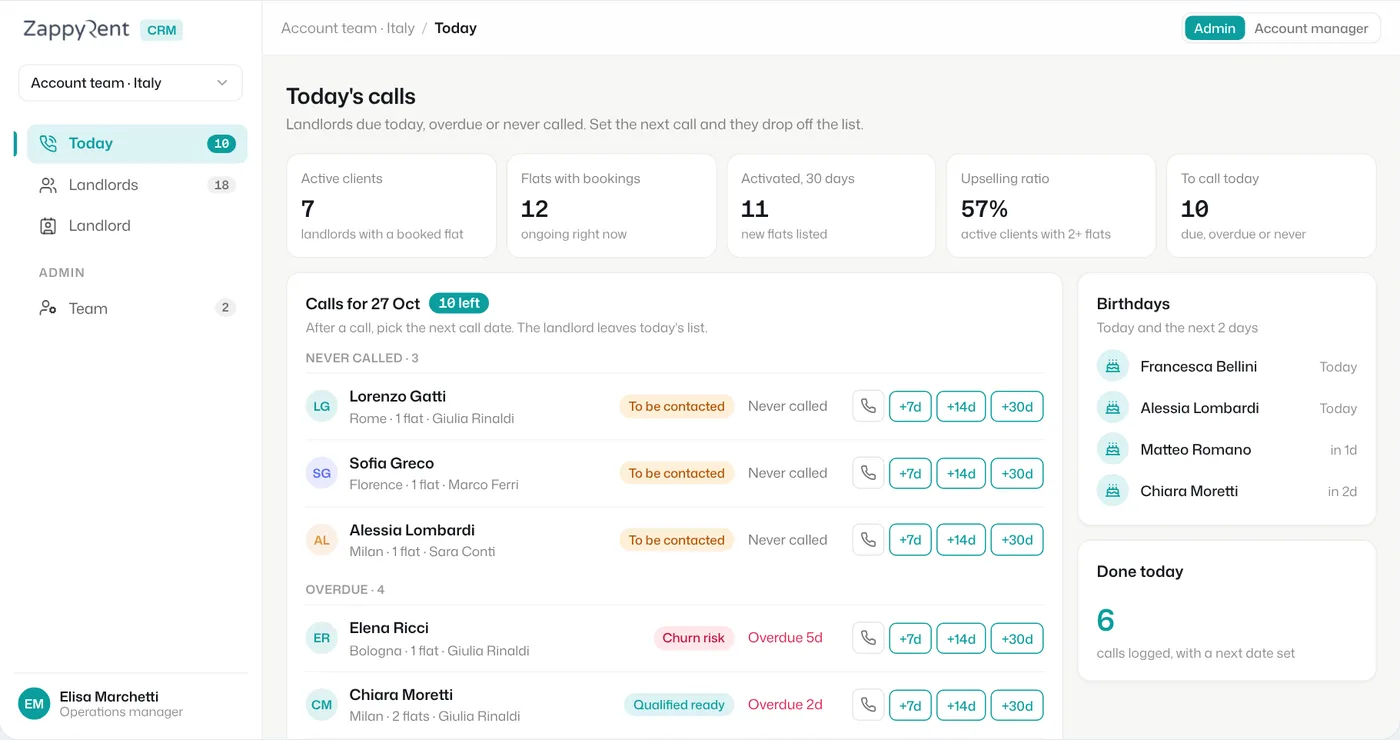
| Numbers are pasted in from another system | Copy-paste errors, and the sheet is always a day behind | The app reads the source directly or imports a file | Zappyrent: the CRM reads the live booking database directly |
| Only one person understands the formulas | Nobody can change it while that person is away | Rules in code, with a written handover | Predictive SCS: documented so the founder's team could take it over |
| Manual changes sit on top of the source numbers | Nobody can tell what was typed and what was calculated | Source data stays fixed; changes are stored as overrides | Predictive SCS: overrides that leave source data untouched |
| It is slow, or close to the size limit | Lag on every edit, then a hard stop | A database built for millions of rows | Google Sheets stops at 20 million cells; an Excel sheet at 1,048,576 rows |
Swipe the table sideways for all columns. If three or more are true, plan the move. With two, watch which one grows. With one or none, tidy the sheet and keep it (our rule of thumb). Limits from Google Docs Editors Help and Excel specifications and limits, checked 23 November 2026. Case facts from the linked case pages.
None of the builds below hit a size limit. Predictive SCS had thousands of rows per client, far under Excel's 1,048,576. Every month the team rebuilt each client's workbook by hand, and a saved copy of the file was the only version history. The clothing brand's problem was 20 creators spread across three tools.
Three ways to turn a spreadsheet into an app
| Route | Where the data lives | Price (list) | Good for | Where it stops |
|---|---|---|---|---|
| Google AppSheet | Your Google Sheet or Excel file; SQL databases too | $5, $10 or $20 a user a month; Core is included in most paid Google Workspace plans | Forms, checklists and simple records for a team already on Google Workspace | Per-user price grows with the team; cloud databases and APIs are on Enterprise Plus |
| Microsoft Power Apps | Excel files stored in the cloud; Microsoft 365 data through standard connectors | Premium $20 a user a month, paid yearly; some Microsoft 365 licences include limited use with standard connectors | A Microsoft 365 company that keeps its files in SharePoint | The Excel connector reads files up to 25 MB and doesn't support people editing the file while the app writes to it |
| Glide | Glide Tables, Google Sheets, Airtable, Excel | GlideOS from $25 a month ($50 and $125 tiers), billed in credits per member | A quick app on top of a sheet | On Glide Classic each changed row is one update, and spreadsheet sources stop at 25,000 rows per app |
| Softr | Airtable, Google Sheets, SQL databases and others | $19 a month (5 team + 5 client users), $99 (10 team users, expandable), billed yearly | A client portal over data you already keep in a sheet | User caps per plan; the sheet is still your database |
| Your own app in code | Your own database (we use Supabase), in your accounts | About $65 a month to run for any number of users, plus the build | A process clients log in to, or one that sets prices, payments or orders | Someone has to own it; a field change is a code change |
Swipe the table sideways for all columns. Prices and limits from each vendor's own pages, checked 23 November 2026 (AppSheet, Power Apps, Excel connector, Glide, Glide usage, Softr). Own app = Supabase Pro + a Vercel Pro seat + Claude Pro for changes, checked 15 November 2026.
Used on a sheet, the first four keep the spreadsheet as the database and put screens on top, so a first version can be ready the same day. Anyone with access to the file can still edit it directly, though, and the formulas still live in cells. An app in code moves the data into a database with per-user logins and change history, and the rules into code, so the sheet can be retired.
Where AppSheet, Power Apps or Glide is the better pick
We build apps in code, and we'd still point you to these tools in four cases:
- You pay for Google Workspace already. AppSheet Core is included in most paid Workspace plans, so a form-and-records app for your own staff costs nothing extra. Google also lets you prototype for free with up to 10 test users.
- Your company runs on Microsoft 365 and SharePoint. Some Microsoft 365 licences include limited Power Apps use with standard connectors, which covers Excel and SharePoint. Keep the app's data out of a file people also edit by hand. Microsoft's connector notes say the Excel connector doesn't support manual edits to the file while the app is writing to it.
- You need something for a field team this week. Glide and AppSheet both use the sheet you already have as the data source, so a simple checklist app needs no database work.
- The sheet is simple and nobody outside the team sees it. Under three of the signs above, a no-code tool or the sheet itself is the cheaper answer.
All four price per user or per plan tier; the cost table below shows what that means at 5, 15 and 40 people.
What moving looks like: one Excel model turned into a web app
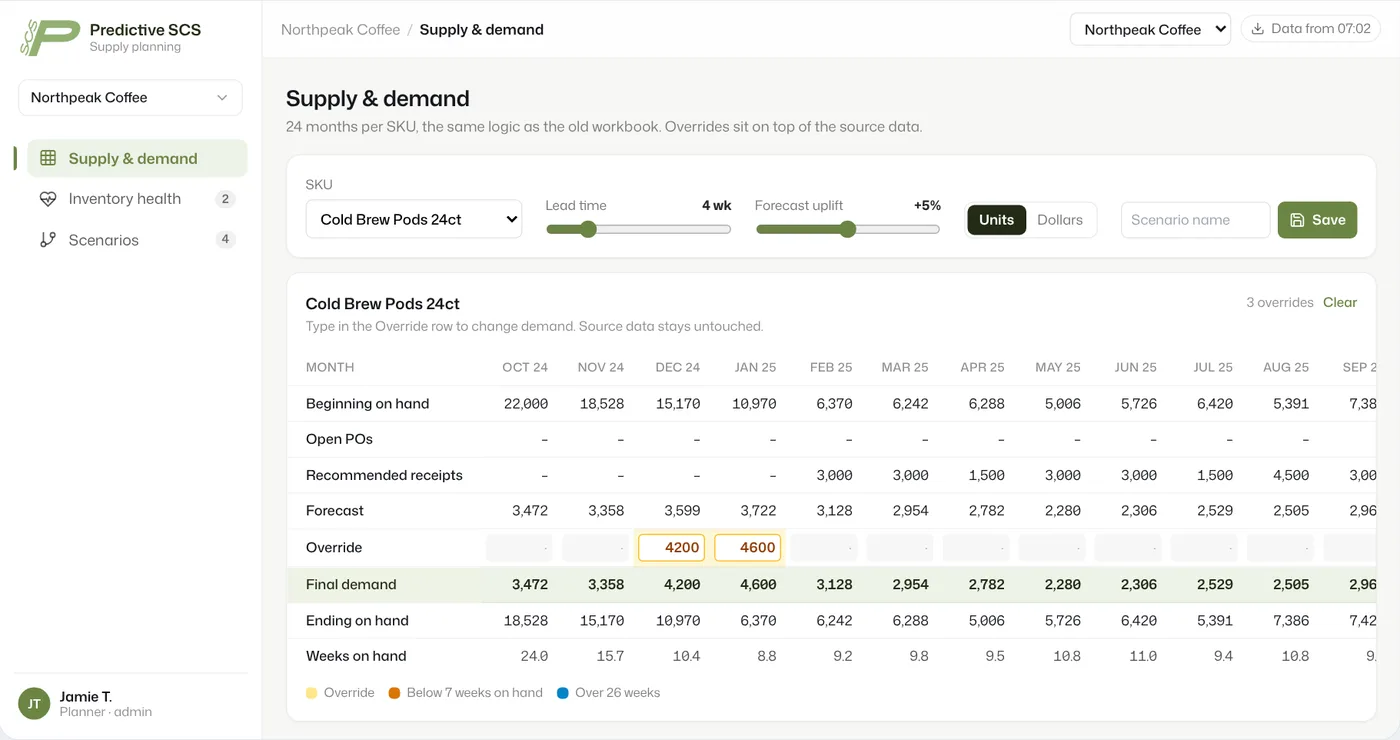
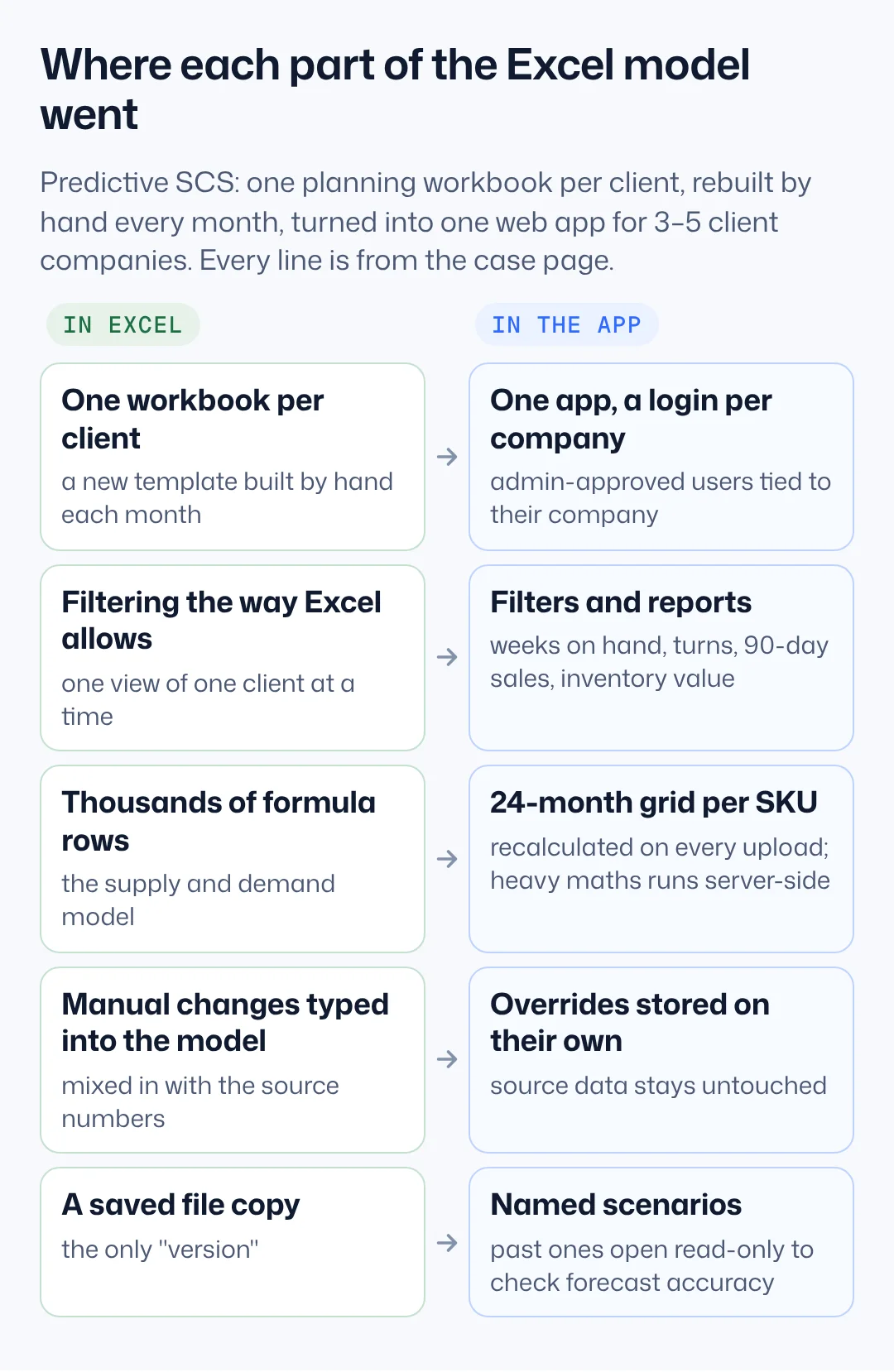
Supply-chain planning for Predictive SCS, moved off Excel
AI runs on · Bubble screens, Supabase for data and logins, n8n running the planning maths in JavaScript
Alex Maibaum runs supply-chain planning as a service for growth-stage consumer brands. Each client's plan lived in its own Excel workbook of thousands of rows, rebuilt from a new template by hand every month.
We rebuilt that model as one app for 3–5 client companies. Each client uploads CSV files (forecast, actuals, on-hand stock, product list, open purchase orders). The app shows a 24-month supply and demand grid per SKU that mirrors the Excel model, lets planners add overrides without touching the source data, saves named scenarios, and reports weeks on hand, turns, 90-day sales and inventory value. Purchase orders export by manufacturer.
This was a full planning product, built on no-code tools in 2024, so it took longer than the one-week first version we quote for a single process today. The first version of the app was approved about three months after kickoff. Alex closed his first customer on it about four months after kickoff, and the app later became the blueprint for the enterprise version his team built in code.
The planning maths runs outside the app, in n8n as JavaScript, and sends an email when a run fails. Without that alert, a failed run would leave last month's plan on screen and planners would order against it.
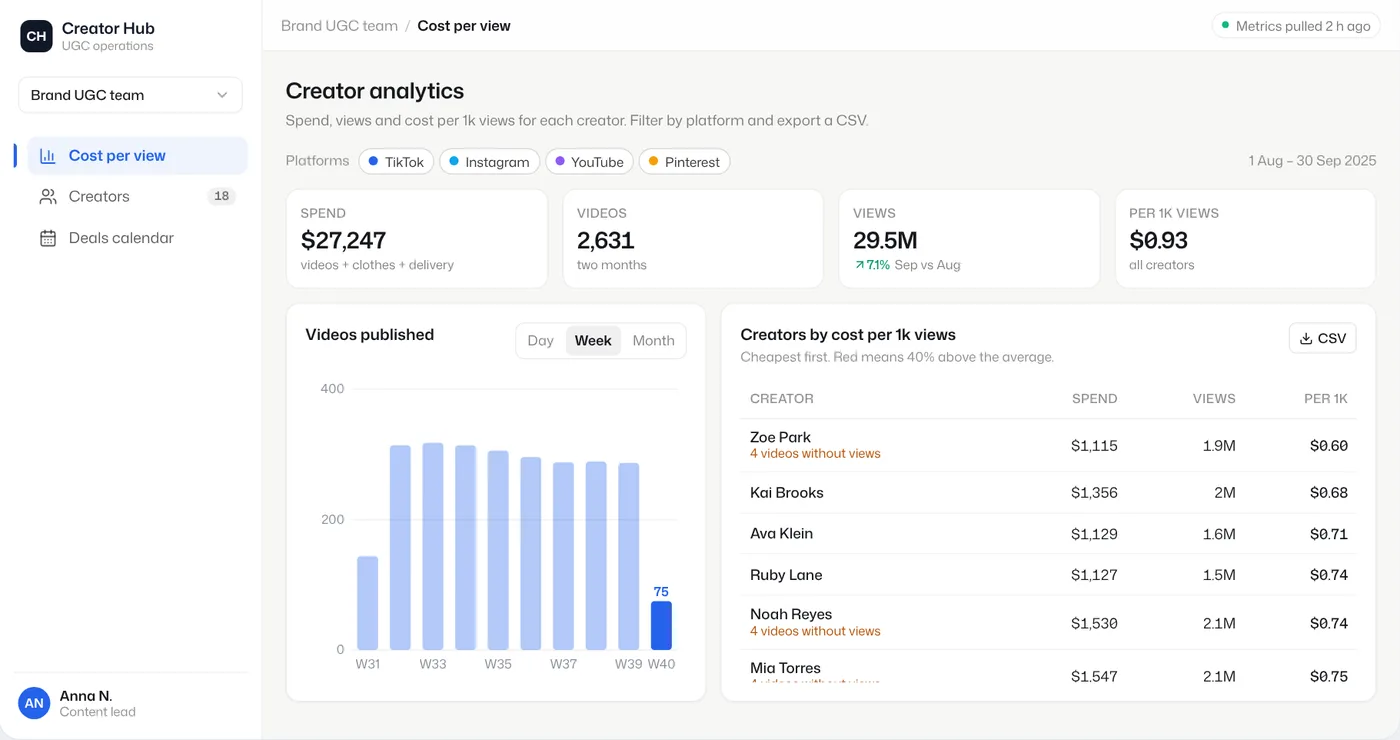
A creator app for a clothing brand that ran on Excel, Notion and a separate database
AI runs on · Lovable (React) front end on a Postgres-style database
A clothing brand ran about 20 creators and 1,300 videos a month through Excel, Notion and a separate database. Nobody could see what a creator really cost once the clothes sent and the delivery were added.
We specced and built one app: a creator directory, deals with their true cost, a content calendar, cost per view per creator with weekly and monthly summaries, and a portal where creators log each video. The first working admin took about two weeks from the first spec.
How to move a spreadsheet to an app, step by step
We followed this order at Predictive SCS and at the clothing brand.
- Freeze a copy of the sheet. Save today's file as the reference and don't change its structure until the move is done. Every number in the new app gets checked against it.
- List the tabs and the people. For each tab, write down who edits it, who only reads it, and what it feeds. Each tab usually becomes a database table, and each group of editors becomes a role with its own permissions.
- Write each formula that matters as a rule in plain words, with one worked row, for example "reorder quantity = next 3 months of forecast minus stock on hand, never below zero". Expect it to take longer than the import; it is also where forgotten formulas turn up.
- Separate source data from manual changes. Anything a person types over a calculated number becomes an override stored on its own. You keep the original and can see who changed what.
- Export each tab to CSV and import it. Keep the CSV import in the finished app if another system only exports files. At Predictive SCS, clients uploaded CSV files exported from their own ERPs.
- Rebuild the screens people open every day first. Leave out tabs nobody opened in the last month.
- Run both for one full cycle. One month-end, one weekly report. Compare the app's numbers with the frozen sheet on the same input.
- Make the sheet read-only. Keep it as an archive and lock its ranges so nobody keeps typing into it after the app goes live.
What it costs: licences per user vs your own app
| Route | 5 people | 15 people | 40 people |
|---|---|---|---|
| AppSheet Core | $50 | $150 | $400 |
| AppSheet Enterprise Plus (databases, APIs) | $100 | $300 | $800 |
| Power Apps Premium, paid yearly | $100 | $300 | $800 |
| Own app: database, hosting, Claude for changes | $65 | $65 | $65 |
Swipe the table sideways for all columns. Our arithmetic on list prices checked 23 November 2026 (AppSheet, Power Apps) and 15 November 2026 (Supabase Pro $25, Vercel Pro seat $20, Claude Pro $20). AppSheet Core costs nothing extra on most paid Google Workspace plans. Own app excludes the build, AI usage by the app and email sending.
Your own app costs a build up front and about $65 a month at any of these sizes. That $65 is paid by you, straight to the providers: the database (Supabase), the hosting (Vercel) and a Claude plan used to make changes. The app runs in your accounts and you own the code. After launch, someone makes the changes: a person on your team using Claude Code, or a developer you hire, which can be us. Our builds start at $1,990 for a working version of one process in about a week, in your own accounts.
At five people on AppSheet Core the licence stays cheaper, at $50 a month or nothing extra on most Workspace plans, against $65 plus a build. At 15 people on AppSheet Core the licence costs $150 a month, so a $1,990 build pays back from the difference in about 23 months, and never if Core comes with your Workspace plan. At 40 people on Enterprise Plus, the difference is $735 a month. Outside users change the sums too: clients who log in to a no-code tool each need a licence, while in your own app they are rows in a users table.
Why we build this in code now
We built Predictive SCS on Bubble, Supabase and n8n in 2024, and it carried 3–5 client companies. We'd build it in code today, for three reasons from that project:
- The logic sat in three tools. Screens were in Bubble, data in Supabase and the planning maths in n8n, so one rule change could touch all three. In code it is one repository, with every change in its history.
- Predictive SCS ended up in code anyway. Predictive SCS used the app as the blueprint for an enterprise version built in code, so it paid for two builds.
- Building in code is now quick for us. With Claude Code, a first version with a database, logins and a screen per role takes us about a week, which was the main time saving no-code used to offer.
When to keep the spreadsheet
- One person owns it. A sheet only you edit has no version problem.
- It is a list. Contacts, an inventory count, a content calendar. Filters and a shared view are enough.
- The structure changes every week. If you add columns as you learn, a sheet is the right tool until the process settles.
- It is a model you play with. Forecasts and what-if scenarios for one analyst belong in a spreadsheet. Predictive SCS kept the planning logic of its Excel model and moved because clients needed their own logins.
- Nobody will own the app. An app needs an owner who answers when an import fails. Without one, a tidy sheet with locked ranges and a change log tab is the safer choice.
Questions people ask
- How do I turn a spreadsheet into an app?
Freeze a copy of the sheet, list each tab with who edits it, write every important formula as a rule, then import the tabs into a tool or a database and rebuild the screens people open every day. Run the app and the sheet side by side for one cycle, then make the sheet read-only.
- Can I convert my Excel file to an app for free?
For a test, yes. AppSheet is free for prototyping with up to 10 test users and for personal use with up to 3 users. Glide has a free plan, and Softr's free plan allows 3 builders and 5 app users. A team using the app every day ends up on a paid plan, from $5 a user a month on AppSheet (checked 23 November 2026).
- How do I convert Excel to an app my team can log in to?
Move the data out of the file into a database, then add logins and roles. Power Apps can sit on Excel files stored in OneDrive or SharePoint, but its Excel connector reads files up to 25 MB and doesn't support people editing the file while the app writes. For anything with outside users or money attached, we import the sheet into Supabase and build the screens in code.
- Can Excel work as a database?
For one person and a few thousand rows, it works. It has no logins per row, no record of who changed a value, and a hard limit of 1,048,576 rows per sheet; Google Sheets stops at 20 million cells. Once several people write to it every day, as the clothing brand's 20 creators did, a database with logins is safer.
- Is Excel still relevant in 2026?
Yes, for models, lists and analysis by one person. Excel struggles once outside companies need their own view of the same file, which is what pushed Predictive SCS and its 3–5 client companies into an app.
- How much does it cost to turn a spreadsheet into a custom app?
Our builds start at $1,990 for a working version of one process in about a week. Running it costs about $65 a month for the database, hosting and a Claude plan for changes, for any number of users.
SOURCES
- 1.AppSheet pricing (appsheet.com) · checked 23 November 2026
- 2.AppSheet: free for prototyping and personal use (AppSheet Help) · checked 23 November 2026
- 3.AppSheet Core in Google Workspace editions (AppSheet Help) · checked 23 November 2026
- 4.AppSheet data sources (AppSheet Help) · checked 23 November 2026
- 5.Power Apps pricing (microsoft.com) · checked 23 November 2026
- 6.Power Platform licensing and Microsoft 365 use rights (Microsoft Learn) · checked 23 November 2026
- 7.Excel Online (Business) connector limits (Microsoft Learn) · checked 23 November 2026
- 8.Glide pricing (glideapps.com) · checked 23 November 2026
- 9.Glide usage, updates and row limits (Glide docs) · checked 23 November 2026
- 10.Softr pricing and plans (Softr docs) · checked 23 November 2026
- 11.Google Sheets file size limits (Google Docs Editors Help) · checked 23 November 2026
- 12.Excel specifications and limits (Microsoft Support) · checked 23 November 2026
- 13.Supabase pricing (supabase.com) · checked 15 November 2026
- 14.Vercel Hobby and Pro plans (Vercel docs) · checked 15 November 2026
- 15.Claude plans and pricing (claude.com) · checked 21 November 2026
- 16.Case: Predictive SCS supply-chain planning app · checked 23 November 2026
- 17.Case: creator app for a clothing brand · checked 23 November 2026
- 18.Case: Zappyrent landlord CRM · checked 23 November 2026
Prices checked 15 November 2026 · on each vendor's own pricing page: Google AppSheet, Microsoft Power Apps, Glide, Softr, Supabase, Vercel, Claude plans.
Drafted with Claude from our project records; checked and edited by Mark.